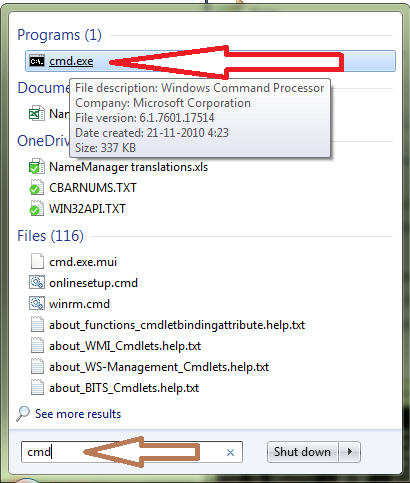
Je wilt een boel bestanden hernoemen. Daar bestaat speciale software voor. Toch kan dat ook met Excel. Om te beginnen start je het programma cmd.exe ofwel de “command prompt”. Even op de startknop van Windows klikken (linksonder) en in het zoekvenster cmd typen. Bestandsnaam verschijnt ergens boven, rechtsklikken en uitvoeren als administrator.
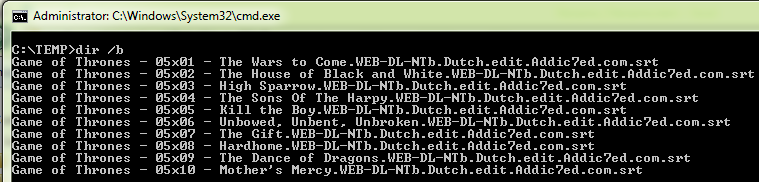
In het zwarte venster dat verschijnt ga je naar de map waar je bestanden staan. Ik koos voor C:\TEMP. Daar kom je als volgt. Tik eerst:
cd \ en dan cd TEMP en tenslotte dir /b
Je krijgt dan de bestandsnamen te zien. Eventueel venster groter maken. Door nu linksboven op dat klein zwart icoon te klikken, komt er een menu. Kies voor Edit | Mark. Je kunt nu door te slepen met de muis je bestanden selecteren. Eenmaal alles geselecteerd kiezen voor Edit | Copy (kopiëren)
Schakel over naar Excel, selecteer A1 en kies voor Paste (plakken). Zo, nu staan alle bestandsnamen onder elkaar (rode gedeelte). We willen het volgende gedeelte in de bestandsnaam verwijderen:
.WEB-DL-NTb.Dutch.edit.Addic7ed.com
Selecteer cel B1 en voer de volgende formule in:
=SUBSTITUEREN(A1;”.WEB-DL-NTb.Dutch.edit.Addic7ed.com”;””)
Doorvoeren naar beneden.Nu heb je in Kolom B de juiste bestandsnamen staan (groene gedeelte).


Tenslotte onderstaande code in een module plakken. Alt+F11 | Invoegen | Module en plakken. Code uitvoeren door op F5 te drukken. Als de code vraagt om de juiste map aan te geven ga je naar de map waar je je bestanden hebt staan.
Option Explicit

'I presume you've got a lot of file names. 10, 100 or 1000?
'- Start up command prompt (cmd.exe) and run as administrator.
'- Go to directory where your files are. Let's presume C:\temp
'- Type dir /b
'- Look for the little black icon at the top left
'- Choose Edit | Mark. You can now select your files.
'- Choose Edit | Copy
'- Go to Excel and start up a new workbook and select A1
'- Hit Paste

'Now suppose your file name is something like: Fortitude.S01E01.WEB-DL.XviD-FUM.jpg
'and you want to replace the part "WEB-DL.XviD-FUM" with "IMG_" (without quotes.)
'- Go to B1 and enter formula =SUBSTITUTE(A1;"WEB-DL.XviD-FUM.jpg";"IMG_.jpg") Attention, I use semi colon and not comma because I have Dutch version.
'- Copy down
'- Now you have your correct file names in B1
'- Copy and Paste this code in a new module -> Alt+F11 | Insert | Module
'- Run the code with View | Macros |View macros | RenameFiles | Run
'- it will pause and you have to point to the directory where your files are.

Sub RenameFiles()
Dim xDir As String
Dim xFile As String
Dim xRow As Long

    With Application.FileDialog(msoFileDialogFolderPicker)
        .AllowMultiSelect = False
        If .Show = -1 Then
            xDir = .SelectedItems(1)
            xFile = Dir(xDir & Application.PathSeparator & "*")
            Do Until xFile = ""
                xRow = 0
                On Error Resume Next
                xRow = Application.Match(xFile, Range("A:A"), 0)
                If xRow > 0 Then Name xDir & Application.PathSeparator & xFile As _
                    xDir & Application.PathSeparator & Cells(xRow, "B").Value
                xFile = Dir
            Loop
        End If
    End With
End Sub